


What is ShareMe?
ShareMe is a file-sharing app by Xiaomi for quick, wireless transfers of photos, videos, apps, and docs without internet. It uses Wi-Fi Direct for speeds up to 20MB/s, 200x faster than Bluetooth. Popular in India and Asia, it has 500M+ users and works on Android 5.0+.
Over 1B downloads on Google Play confirm its dominance in offline sharing.
Key Features
ShareMe stands out for simplicity and speed in peer-to-peer transfers, as noted in TechRadar’s in-depth review.
- Offline mode: No mobile data or Wi-Fi hotspot needed; direct device connection.
- Cross-platform: Android to iOS, PC/Mac via web share or APK.
- File types: Images, videos, music, APKs, docs; multi-select and folder sharing.
- Extras: QR scan connect, file history, dark mode, music extractor (premium).
- Security: No servers involved; end-to-end without cloud storage.
- Free version has ads; premium unlocks ad-free, unlimited speeds.
How to Download and Use ShareMe
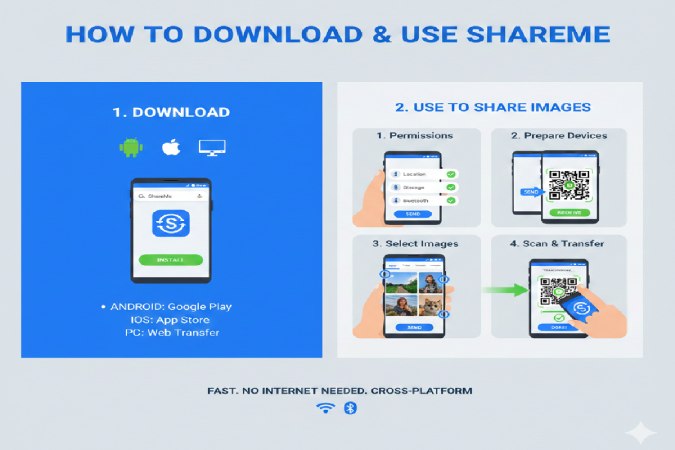
Download: Get from Google Play (com.xiaomi.midrop) or official site shareme.download for APK/PC.
Android Setup:
- Install and grant storage/Wi-Fi permissions.
- Open app, select “Send” or “Receive.”
- Scan QR or nearby devices; choose files and transfer.
PC Transfer: Use ShareMe for PC/Mac or web.shareme—scan QR from phone.
iOS: App Store version supports incoming from Android.
Pro tip: Create avatar for easy ID in groups.
Performance and Speed Tests
ShareMe hits 20MB/s in tests, ideal for large videos (1GB in ~1 min). Real-world: Faster than Bluetooth (350KB/s) or email limits.
Recent 2025 reviews praise stability on mid-range phones like Xiaomi/Realme. Battery drain minimal vs competitors.
ShareMe vs Competitors
Competitors cover basics but lack ShareMe’s ad-free speed on Android.
| App | Speed | Ads | Cross-Platform | Android Focus | Premium Perks |
| ShareMe | 20MB/s | Yes (free) | Android/iOS/PC | High | Ad-free, unlimited |
| Xender | 40MB/s | Yes | All platforms | Medium | File mgmt |
| SuperBeam | Wi-Fi/QR | No | Android only | High | NFC bonus |
| Files by Google | 10MB/s | No | Android | Medium | Cloud hybrid |
ShareMe wins for pure Android groups; Xender for multi-OS.
Pros, Cons, and Common Mistakes
Pros:
- Blazing speed, no internet bills.
- Simple UI for all ages.
- Privacy-focused (no cloud).
Cons:
- Ads in free tier annoy during transfers.
- Limited iOS outgoing; PC needs web.
- Occasional bugs on old Android (pre-8.0).
Mistakes to Avoid:
- Forget permissions: Blocks storage access.
- Poor signal: Stay close (within 10m).
- Ignore updates: Latest APK fixes speed drops.
Is ShareMe Safe in 2026?
Yes—direct P2P avoids hacks; no data logging reported. Xiaomi’s 500M+ trust base and Play Protect scans confirm safety. Avoid third-party APKs; stick to official.
Ratings & Reviews Summary
ShareMe garners solid user ratings averaging 4.3/5 across platforms, praised for blazing speed but dinged for ads—ideal for Android file sharing per your article context.
| Platform | Rating | Pros Highlighted | Cons Highlighted | Sample Review |
| Google Play | 4.3/5 (1B+ downloads) | Lightning-fast (20MB/s), offline, cross-Android | Intrusive ads (double-sided), permission creep | “Transferred 2GB video in <1 min vs Bluetooth hell—ads suck tho.” |
| TechRadar | Recommended | Intuitive UI, outperforms Bluetooth/cables | Ad-supported, lacks cloud/encryption | “Go-to file-sharing app… swift transfers, but ads annoy.” |
| Wondershare Drfone | 4.2/5 | Reliable Wi-Fi Direct, multi-file support | Proximity limits, no malware scan | “Smooth, flawless… essential for offline transfers.” |
| TechLomedia (2025) | 9/10 | Clean interface, no ads (Android), WebShare | iOS limitations | “Best file-sharing app… fast movies/games instantly.” |
| App Store (iOS) | 4.4/5 | Secure, broad file types | Ads on iOS | “Lightning-fast… perfect for photos/videos.” |
Verdict: 4.3⭐ average—speed/privacy win for India/Android users (matches your pros), but premium upgrade fixes ad complaints. Perfect companion to your comparison table showing ShareMe’s edge over Xender for groups.
Conclusion:
ShareMe (formerly MiDrop) is Xiaomi’s free app for ultra-fast, offline file transfers up to 20MB/s across Android/iOS/PC. Ideal for India users; beats Bluetooth with no data use. Premium removes ads; alternatives like Xender offer cross-platform but with ads.
FAQ
What is ShareMe used for?
Fast offline file sharing between phones/PCs without data.
Is ShareMe free?
Yes, with ads; premium ~₹50/month removes them.
ShareMe vs Xender—which is better?
ShareMe for ad-light Android; Xender for broad platforms.
How to transfer from Android to iPhone?
Use ShareMe’s cross-mode: Sender scans receiver QR.
ShareMe PC download?
From shareme.download; no emulator needed.


 Welcome To Next Level Techie, For any queries you can contact us at :